


Get to know how to read and make your GA4 bounce rate better. Learn 7 effective tips to increase user engagement, decrease drop-offs, and increase your conversions through workvix.com insights.
This will require the use of 7 proven methods to learn how to master GA4 Bounce Rate and launch your website to new heights – Workvix.com.
One of the most talked about indicators in Google Analytics 4 (GA4), which completely changed how marketers and business owners quantify user engagement, is the GA4 bounce rate.
In contrast to the old Universal Analytics model, GA4 reconceptualizes the meaning of bounce rate to provide you with a deeper understanding of visitor behavior on your site. And along with this new definition confusion arises–what is the GA4 bounce rate, how is it calculated and how can you improve it?
All this will be broken down into a detailed guide that will provide you with handy tips that can ensure that your website does not only retain visitors but turns them into returning customers as well.

What GA4 Bounce Rate and Why Does It Matter?
The GA4 bounced rate is the percentage of the sessions in which the users are not held. Visits that take more than 10 seconds, and include at least one conversion event, or at least two pageviews/screens, will be considered engaged sessions in GA4. Any session, which does not satisfy these requirements, is considered a bounce.
Such a redefinition turns GA4 bounce rate a more realistic measure of user engagement than the previous model, which treated any single page visit as a bounce, even though the user had read your content and perhaps spent several minutes doing so.
Why it matters:
The high GA4 bounce rate is an indicator that the users are not getting what they require.
It has an indirect influence on SEO because search engines rank the websites that fulfill user intent.
It can have a direct impact on your conversion funnel, when the user leaves before finishing, they are not purchasing, subscribing or connecting with you.
You can find GA4 Bounce Rate in your reports as follows.
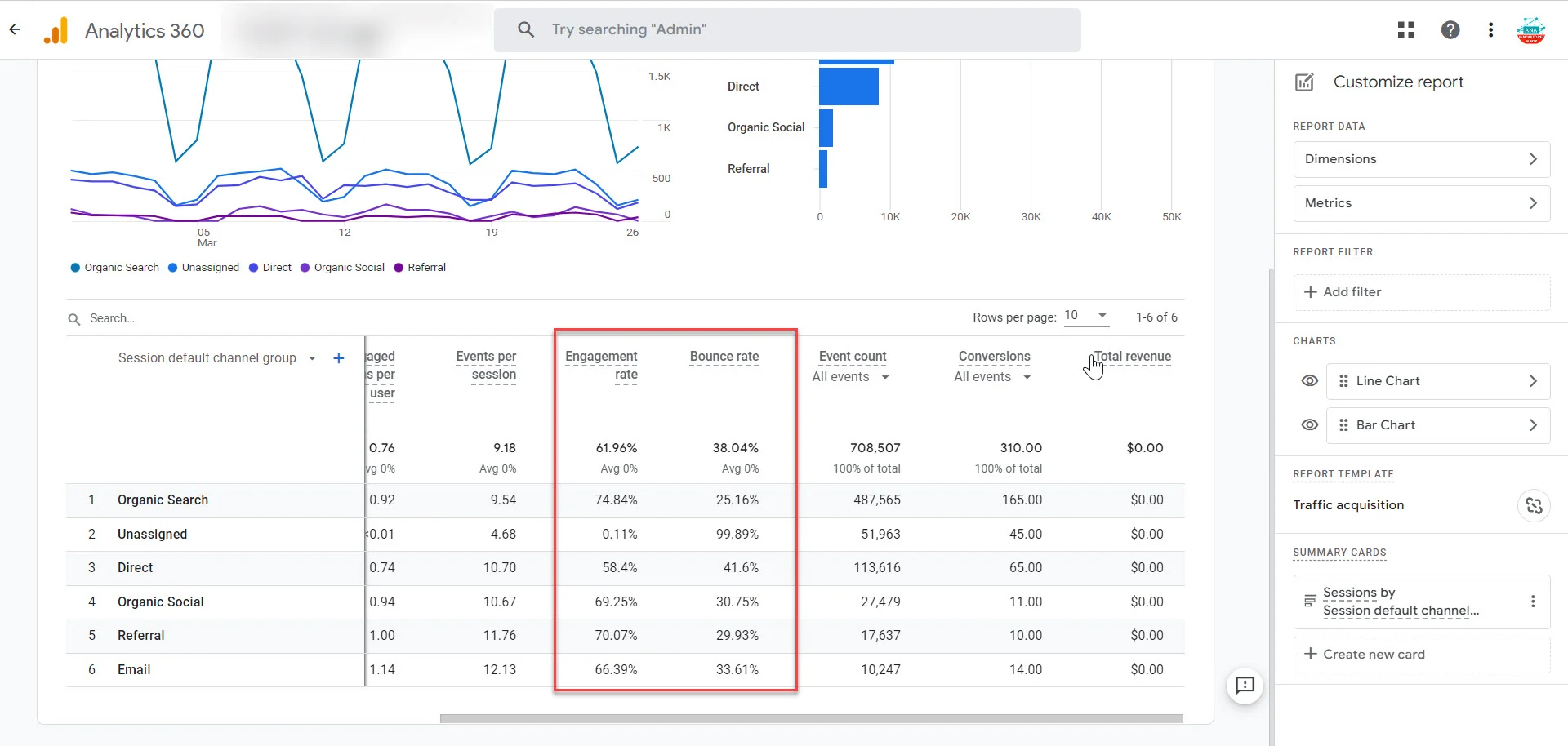
Bounces are not as easily found in GA4 as in Universal Analytics. You must personalize your reports:
Open Reports – Engagement – Pages and Screens.
Select Customize Report.
Add the measurement Bounced Rate to your table.
Your custom report can be saved to be accessed easily in the future.
With this setup, you can see GA4 bounces rate per page in real-time and can thus identify problem areas quickly. To have a step-by-step tutorial, you can visit in-depth analytics tutorials on Studycreek.com.
What Is a Good GA4 Bounce Rate?
Your benchmarks will depend on your industry, traffic source, and the type of audience:
E-commerce sites: 20%-45%
B2B websites: 25%-55%
Blogs and content sites: 60%-80%
Do not attempt to reach to the ideal number, focus on improvement trends. When bounced by 70 percent on GA4 target 55. If it’s 40%, aim for 30%.
The aim is improvement, not excellence.
Typical causes of a High GA4 Bounce Rate.
Some reasons behind a high GA4 bounce rate include:
Slow loading pages- Customers abandon your site after it takes more than 3 seconds.
Poor content relevance – Customers come to your site but fail to see the value that your title or advert promises them.
Pop-ups or advertisements – Intrusive lead capture forms are aggressive and will send users away.
Mobile usability problems – A fixed design sends mobile visitors away immediately.
Complex navigation – When users are not able to locate anything within a couple of seconds, they go away.
This is because, by determining the underlying cause, you can design remedies that reduce your GA4 bounce rate with time.
The 7 strategies to improve the GA4 Bounce Rate.
At this point, we can consider actionable strategies that will help to decrease the GA4 bounce rate and improve the engagement. These measures are aimed at companies that are interested in attracting, retaining, and converting users more effectively.
Improve Page Load Speed
Even a one-second delay can increase your bounce rate by 10 percent. Identify the performance bottlenecks, such as Google PageSpeed Insights, or GTmetrix.
Compress images.
Make use of a content delivery network (CDN).
Minimize heavy scripts.
A quicker site translates into a reduced GA4 bounce, and a happier user.
Match Content to User Intent
Make sure that your headlines, meta descriptions and ad copy match the actual content on your page. When your page claims to offer best CRM software, make sure that visitors do not look at comparisons between CRM software, but generic business information. Such similarity reduces bouncing and creates trust.
Optimize for Mobile First
Over 60% of web messaging traffic is on smart phones; thus, GA4 bounces rates are reliant on responsive mobile design. Test your site across several devices and separate mobile-performance tracking with GA4 device reports.
Establish Good internal linking.
Provide an incentive to hang around by including related articles, products or services in your content. An internal link structure leads the visitors deeper into the site and minimizes single-page interaction and decreases the bounces.
Have explicit Calls-to-Action (CTAs).
Lead the visitors to the next step. It can be Schedule a Demo or Download a Guide or Shop Now, but CTAs ensure your users continue their journey through your site rather than leaving it after visiting a single page.
Offer Scannable Content of High Value.
Majority of the users are skimmers. Break up text with:
Subheadings (H2, H3)
Bullet points
Images or infographics
Short paragraphs (2-3 sentences)
This type of structure is not only GA4 bouncing rate enhancement but also SEO and user experience. To get other tips on enhancing the content interaction, visit Dissertationhive.com.
Conduct A/B Tests to Determine What works.
Google Optimize or Optimizely can be useful in testing headlines, page layouts, and CTAs. Any minor alteration such as changing a button color or moving something above the fold can do a lot to reduce your bounce rate.
Improve Conversions with the help of GA4 Bounce Rate.
It is not the aim to lower the bounce rate but to turn the users into customers.
The lower the GA4 bounce rate, the longer the visitor is staying on your site.
The more active the users, the more they will be willing to sign up, buy or get in touch with you.
Coupled with other metrics, such as average engagement time on a project, you can see a complete picture on how to optimize your funnel with the GA4 bounce rate.
The optimal way to use Workvix.com to optimize GA4 Bouncing.
At Workvix.com, we focus on assisting companies to utilize the power of GA4 analytics in full. You can rely on our team to help you create proper reports, analyze your GA4 bounce rate, or employ CRO (conversion rate optimization) techniques, to make sure that you convert data into tangible business outcomes.
Not only do we monitor your GA4 bounce rate, but also demonstrate how to correct it and achieve actual growth.
Key Takeaways
The GA4 bounce rate is an indicator of users finding value in your site within a short period of time.
Bounce rate is defined by engaged sessions in contrast to Universal Analytics.
High bounce rate on GA4 indicates that the content is misaligned, the pages are slow, or the user experience is low.
Get seven tips to lower bounce rate: boost speed, match content, go mobile-first, add internal links, include direct calls-to-action, make content scannable, and create A/B tests.
The collaboration with Workvix.com assists you to analyze analytics and convert insights to revenue.